 by
by The CogniFit for Professionals platform allows you to add patients to groups for easy management. This can be useful to divide patients according to their cognitive condition, the day you have a session with them, age or many other factors.
To create a group, follow the steps below:
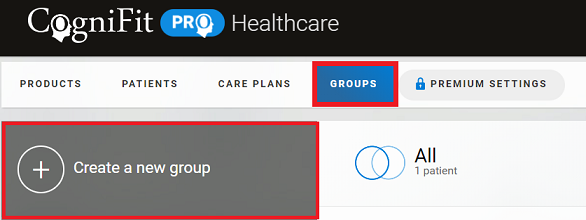
1. Log in to your CogniFit professional account, select the “Groups” tab in the control panel of your account home page and click on “Create a new group”.
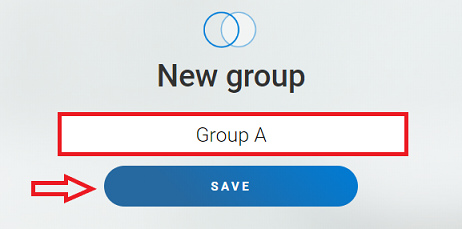
2. Enter the group name and click the “Save” button.
Note: To create a group you have to first add patients to the platform. Each patient can only be in one group at a time. You can see how to add patients to a group here.
3. The created group will appear in the panel on the left.
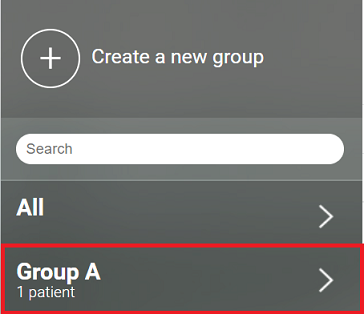
By clicking on it, you can change the name of the group or delete it.

3.1 To edit the group name click the “Edit group” button, enter another name and click the “Save” button.

3.2 To delete the group click the “Delete group” button. The group will be deleted automatically after clicking this button.

If you have any questions you can contact our support team by sending an email to support@cognifit.com