 by
by Please note that patients can also register directly with CogniFit.
In this video you will learn all about patient registration.
As a healthcare professional, it will only take a few clicks to register your patients with CogniFit. Follow the steps in section 6.2 of the article “How to add your patients? “
If you have already sent the intervention to the patient’s email address, but the patient was unable to register, you can register the patient’s account later. Follow these steps.
1. Log in to CogniFit and access the Patients tab
1.1 Click on the patient’s name in the list.
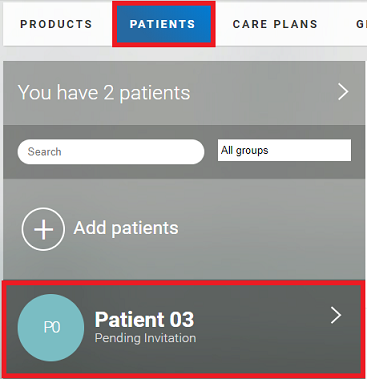
1.2 Start the patient session
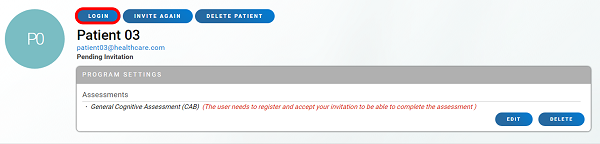
The patient profile will then open. At this time, the invitation is pending as the patient is not yet registered. Review the type of intervention assigned (follow these steps if you want to change the type of the assigned program) and click Login.
2. Register on behalf of the patient
On the page that opens, check the patient’s details and click on the Sign Up button.
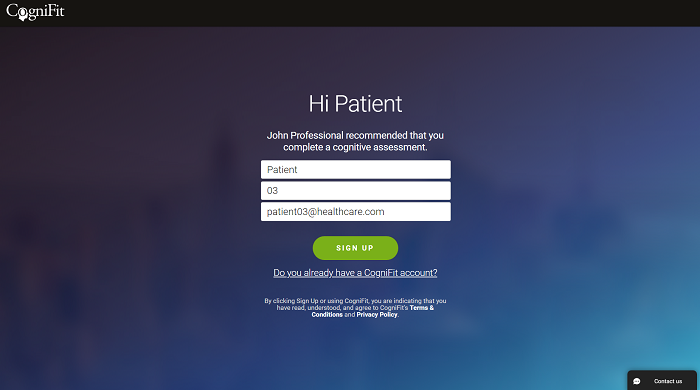
Then follow the instructions on the platform. Add the password, the patient’s gender, and the date of birth and select the option to share the patient’s results with your Healthcare Professional account. The patient can change this privacy setting later.
If you have any questions you can contact our support team by sending an email to support@cognifit.com